
Fill gaps and approve swaps without the group chat
Managers offer open shifts and handle swap requests in Urhere. Every change needs approval before it updates the roster.
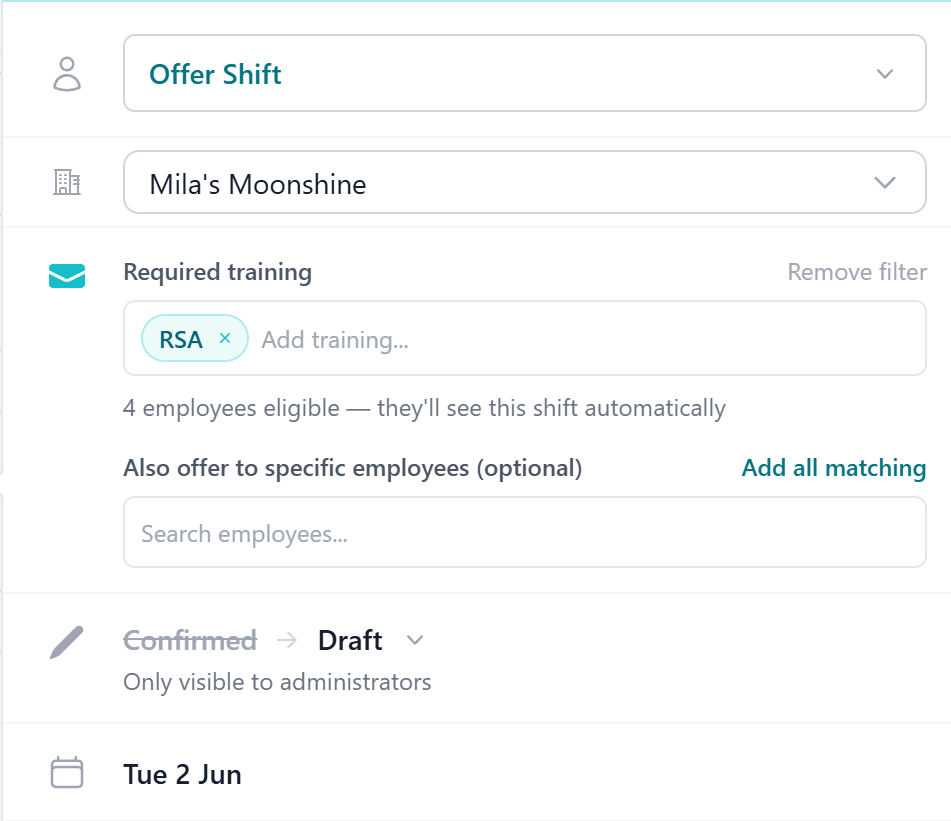
Shift changes handled in the roster system, not the group chat
When shift swaps and open shift offers happen outside the rostering system, the roster stops reflecting what is actually happening. Urhere brings shift changes back into one place — with manager approval required before anything changes.
Handle shift changes without the back-and-forth
Give managers control while making it easier for staff to manage their shifts.
Open shift offers
When a shift needs filling, managers offer it to eligible employees. Staff accept from the app, and the manager confirms who gets it.
Employee swap requests
Employees request to swap a shift with a colleague through the app. Managers review and approve before the roster changes.
Manager approval required
Every shift change — swap or offer — requires manager sign-off. Nothing updates on the roster without approval.
Eligibility checks
When reviewing a swap, managers see whether the employee taking the shift has the right role, is available and would not breach hours limits.
Roster updates automatically
Approved swaps and accepted offers update the roster immediately. No manual editing needed to reflect the change.
Fewer messages to manage
Shift change requests come through Urhere, not group chats or text messages. Managers action them in one place.
Review swap requests with eligibility information upfront
When an employee asks to swap a shift, managers need to know whether the person taking the shift is suitable before approving. Urhere surfaces that information at the point of review.
Managers can see whether the receiving employee is available, has the right role, and whether the swap would put them over their contracted hours — before confirming the change.
- Employee giving and receiving shown side by side
- Availability, role and hours checks displayed
- Approve or decline with a single action
- Roster updates as soon as the swap is confirmed
.png)
How shift swaps and offers work in Urhere
Request or offer created
An employee submits a swap request, or a manager creates an open shift offer. Both go through Urhere — not side messages.
Manager reviews the request
The manager sees the request with eligibility details — availability, role match, hours. They approve or decline based on the full picture.
Employee notified
The employee is notified of the outcome through the app. If approved, the shift change is confirmed. If declined, they see the reason.
Roster updated automatically
Approved changes update the roster straight away. Managers always see the current, accurate schedule without manual corrections.
Common questions about shift swaps and offers
One flat price per location, per month.
Rostering, time and attendance, timesheets and payroll exports — one flat price per location. No per-user fees, no add-ons, no lock-in. Try free for 14 days.